Posts

Showing posts with the label Cognos Report Studio

Cognos Dataset Schedule issue

Issue: When trying to schedule dataset  to refresh at specific times, the schedule is failing to run with authentication error. Renew Credentials and test again. Issue persisted.This was caused by package used in the data module. We need to republish packages after upgrade apparently. Also, have to use single data source connection while working with data module based solutions until IBM fixes the issues. In Admin console, in schedule tab, clicking on "run once" also throws error and we have to close window as it just freezes after that.  Data set's individual schedules shows running as "unavailable" and failing Existing issues carried over: Please note that Dataset can still not be scheduled as part of Job like other report objects. This was reported in 11.0.7. Dataset schedule icons unchanged from "?" mark. This was defect reported in 11.0.8.
Cognos Report drill through Issue

When passing a parameter from non interactive report to interactive report, interactive report is getting rendered in non-interactive mode as well and losing interactive control. It is needed to retain “interactivity” defined at detailed report level. Solution is to create hyperlink button containing drill through report url and open in new window.

CA 11.0.7 Report Studio Issues

Radio Button Style Issue When Report style is changed to  11.4 style, for radio Button Value Prompt ( option), additional text of "deselect" starts appearing in the report. We need to update property for deselect text to émpty string to remove this. Drill Through Parameters Navigation: When there are many drill through parameters, as you scroll down and select parameter values, it goes back to top of parameter box. it's kind of inconvenience and increase time to update drill throughs.

How to add decimal to Pie chart percentage values?

When we use Pie Chart property to show percentage instead of absolute value, there is no control over number of decimal places. If user wants to see % in decimal point, we can use conditional style to set format of values to percentage with decimal points. This way absolute value is converted in percentage. Percentage of percentage will still show values in percentage but also retain the decimal value. This way there is no change to underlying calculations in query.

Common Test cases to detect issues on Reporting

Build test cases to detect below common Reporting issues Any blank column on the report for all selection Rows repeating for same dimension and attributes Double addition for amounts for same dimension for different selections Report filtering data for all selections ( default, individual, multi select) Download options working for all selections Query properties and naming conventions followed  Output getting distorted in pdf/excel or parameters, standard logos are not displayed

Cognos: How to remove borders for Radio Button Value Prompt?

Add html item after the radio button. Add below:- < STYLE > Div.clsCheckBoxList{ border-style:none; } <  / STYLE >

Cognos:Converting from single select to multi select prompt Error

Error: An unexpected exception occurred: com.cognos.xqe.data.values.VarcharValue incompatible with com.cognos.xqe.data.values.ArrayValue Cause: We have condition to have default selection "ALL". ([Fund Code] in (?pFund?) )or (?pFund? = ('ALL')) After removing it, error was rectified: [Fund Code] in (?pFund?) and make filter optional.

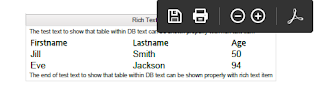
How to retain Tabular data formatting of source text from database in Cognos output

Image
Request: The rich text boxes in Source system allow for the inclusion of tables, but they are not exporting as tables when you read as text item. Other requirement is to have it in pdf format as well. Environment: Cognos 10.2.2 Solution: We can use Rich Text item available in Cognos Report Studio Drag list in page Unlock report and drag rich text item in list column change source of text item to data item value select text field from DB Run report in html/pdf and validate

IBM Cognos Cloud Date Parameter drill through failure

Issue: While moving to Cognos cloud, report fails to pass Date parameter. XQE-DAT-0001 Data source adapter error: java.sql.SQLDataException: ORA-01830: date format picture ends before converting entire input string Version: Cognos 10.2.2 FP3/FP7 Database: Oracle 11g Cause: Cognos is treating Oracle parameters as Timestamp and cast/to_date function at both end doesn't work. Solution: Create data item: (extract(year, ?As Of?) * 100 + extract(month, ?As Of?) ) * 100 + extract(day, ?As Of?) 2. Pass data item value instead of Parameter value 3. In target report, data item should have below ( to use for filtering) and/or displaying: case when (length (?Date?)=8) Then to_date(substring(?Date?, 1,4)||'-'||substring(?Date?, 5,2)||'-'||substring(?Date?, 7,2),'YYYY-MM-DD') Else to_date(?Date?,'YYYY-MM-DD') end

Convert date to Integer for Cognos Drill Through

We can pass dates as number for drill through report if there is  range filter is involved from in built date prompt: Steps: 1.        In Detail report, Create data item where filter is applied on date range [IntegerDate] extract(year,[Date1]) *10000 + extract(month,[Date1])*100+extract(day,[Date1]) 2.        In Detail report, Apply filter - [IntegerDate] between ?date1? and ?date2? 3.        In Summary report list query add below data items: Start Date: extract(year,[date1]) *10000 + extract(month,[date1])*100+extract(day,[date1]) End Date: extract(year,[date2]) *10000 + extract(month,[date2])*100+extract(day,[date2]) 4.        Update Drill through to pass new data items for ?date1? and ?date2? For single date passing via value prompt, it can be passed as To_Char/cast to compare and pass.