Posts

Automated URL generator for Cognos Reports using Cognos Report Studio

Requirement: Users request to provide all report name with Report URL and possible prompt default selection so that they can embed in their external web page for user publishing in the way they want to organize. Report Search path that can be obtained from Audit database: /content/folder[@name=’Samples’]/folder[@name=’Models’]/package[@name=’GO Data Warehouse (analysis)’]/folder[@name=’Report Studio Report Samples’]/report[@name=’Revenue by Year’] Case I: When XSS checking is not enabled, below Cognos Proven Practice document can be used to understand how URL is formed: http://public.dhe.ibm.com/software/dw/dm/cognos/reporting/scripting_techniques/using_urls_in_cognos_8.pdf Case II: When XSS checking is enabled for highly secured intranet environments. Below link provides what needs to be done to encode URL to be compatible:- http://queryvision.com/custom-cognos-url-support-and-cross-site-scripting/ Design: You can use Cognos to create a report to do the enco...
Data Analysis: Identifying Duplicate Rows in Excel

In Excel, there is funciton to remove duplicates; however, didn't find direct method to identifying duplicates based on specific columns. Below is step created to find out duplicate ID columns for further analysis: Column A contains all Customer IDs. We need to identify how many rows are generated for a customer id. Step 1: Sort based on Column A Step 2: Add 3 Columns with below calculations =COUNT(MATCH(A10,A11,0)) as B10 =COUNT(MATCH(A10,A9,0))  as C10 =IF(B10=1,1,IF(C10=1,1,0)) or B10+C10  as D10 Now You can use D10 to filter on 1 to list down all duplicate records for further analysis for reason of what values are different or any other purpose.

Customize Cognos Rave Bullet Chart

Image
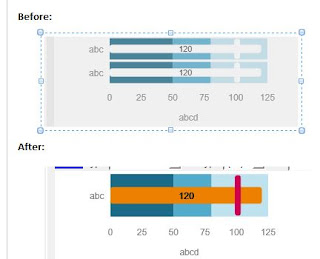
Requirement: To modify Bullet chart Sample Bullet color is not aligned with color standard. Remove labels from charts Remove Satisfactory and Good Category from charts as want to show only Actual and Target for Time dimension. Make it compact to avoid any large space utilization Before Change: Steps: visJSON Update Update Elements to remove Satisfactory and Good section Update color and fonts for Actual and Target sections in Elements Remove Categories from data section and rows values for removed categories Remove Categories from axis section Chart Area Update and Refresh Bundle Remove references from Chart Type Definition for categories Remove from String Resources Refresh Thumbnails Changed Bundle name to avoid overwriting of existing sample Upgrade Definition and visJSON Generate VizBundle Definition Import in Library Reopen Report Studio and use Convert Visualization or get from Tool Box. Tool Used: IBM Visualization Customizer ...

Remove/Customize Marker from Cognos Rave Line Chart

Below section in Rave Line chart defines symbol and it's size,                "symbolStyle":                {                   "size":8                }, It can be removed to get Line chart without any marker.

Cognos Rave Visualization MultiLine Chart

Image
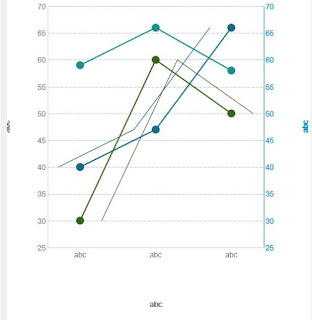
Environment: Cognos 10.2.2 High Level Steps done as follow:- 1. Open given Combination Chart as base in IBM Visualization Customizer Tool 2. Replace Bar Charts from data set sections, Elements sections with Line chart data 3. Change Colors for both data sources to show different colors 4. if needed, remove legend or position to appropriate place. After the change: Use: To show different measures of same dimensions in same chart for comparison.

Cognos Rave Chart Customization Example

Image
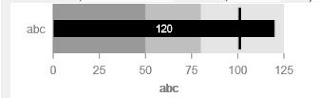
Prerequisite: Download IBM Visualization Customizer from Analytics Zone corresponding to Cognos version Download Visualization Bundle either from Cognos Admin Console or from Analytics Zone (Free available) Bullet Chart Customization Example Chart Name: az.Bullet_10_2_2   Changes: Open Bundle in IBM Visualization Customizer to access vizJSON Line # 119/120 for measure value font size and make it bold At Line 388, change color for Target Bar chart Around line# 502 and 529, removed blocks for second bullet chart Save as different bundle name and validate Import to Cognos Admin console and validate via Rave Visualization for availability and user

Information on MotioPI for Cognos Administration

MotioPI is Desktop admin tool for Cognos and can be used independently( MotioCI is separate tool). Below are typical use cases:- Ø   Download report outputs on local machines in bulk; Ø   Model recovery from Content Store Ø   Administration of Environment - o    Data source information o    Create Report/Objects inventory creation for each application o    Content store bulk cleanup of outputs/schedules o    Owner change for reports/schedules o    Dispatcher/Environment settings o    Report execution times o    Studio to view spec/models and make changes Use the following link to launch MotioPI: http://www.motio.com/products/piLaunch.do Before you launch MotioPI, please visit our getting started webpage at https://www.motio.com/products/pi/gettingStarted.do